The customer scans the product and the terminal shows the price straight from your RobSolution
An in-store price checker like the ones in supermarkets, connected to your management system: product name, stock and the price from the list you choose, with no price tag on the item and no exported spreadsheet. Compatible with Gertec Busca Preço terminals.
- No price tag on the product
- The price is always the system's
- History of what customers looked for

Three steps, no one from the counter involved
The terminal sits on the store wall. The customer holds the product up to the scanner and the answer comes from RobSolution in under a second.
The customer scans
The terminal's scanner reads the product barcode: EAN, the book's ISBN or the internal code printed on the label.
The terminal asks RobSolution
The query reaches your system over the internet or through a local bridge in the store, protected by a key unique to your company.
The display answers
Product name, a second line of your choice (stock, reference or category) and the price from the configured list. Unregistered products get the message you define.
Set up in a minute, follow up every day
Everything lives in RobSolution Settings: key, price list, what shows on the display and the log of every query.
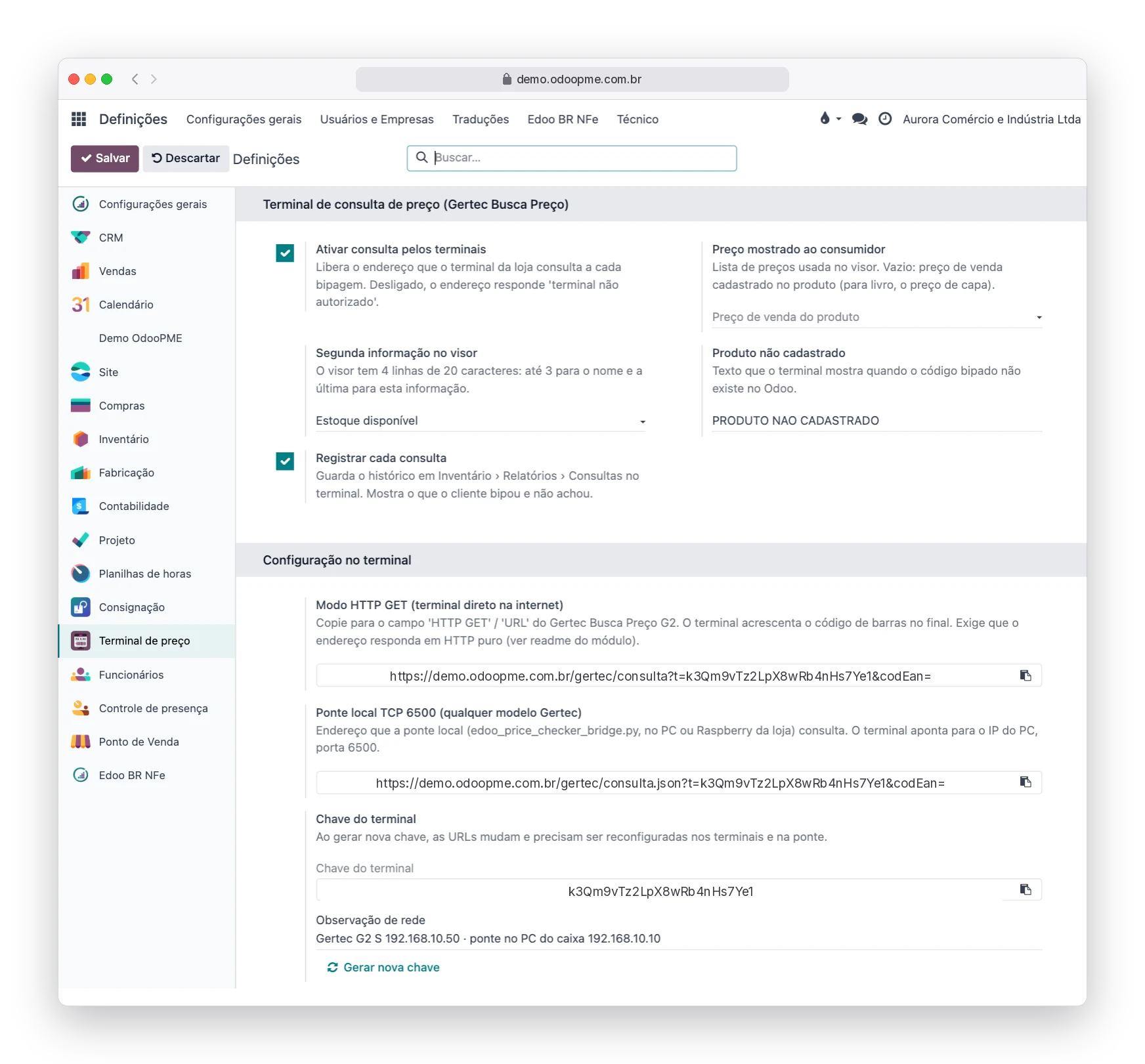
Turn it on and choose what the customer sees
On the Price checker screen you enable the feature, choose the price list shown to the consumer, the second display line and the text for unregistered products. The ready-made URLs for the terminal and for the local bridge appear on the same screen, with a button to generate a new key.
- Counter, website or default product price list
- Second line: available stock, reference or category
- Unique key per company, replaceable at any time
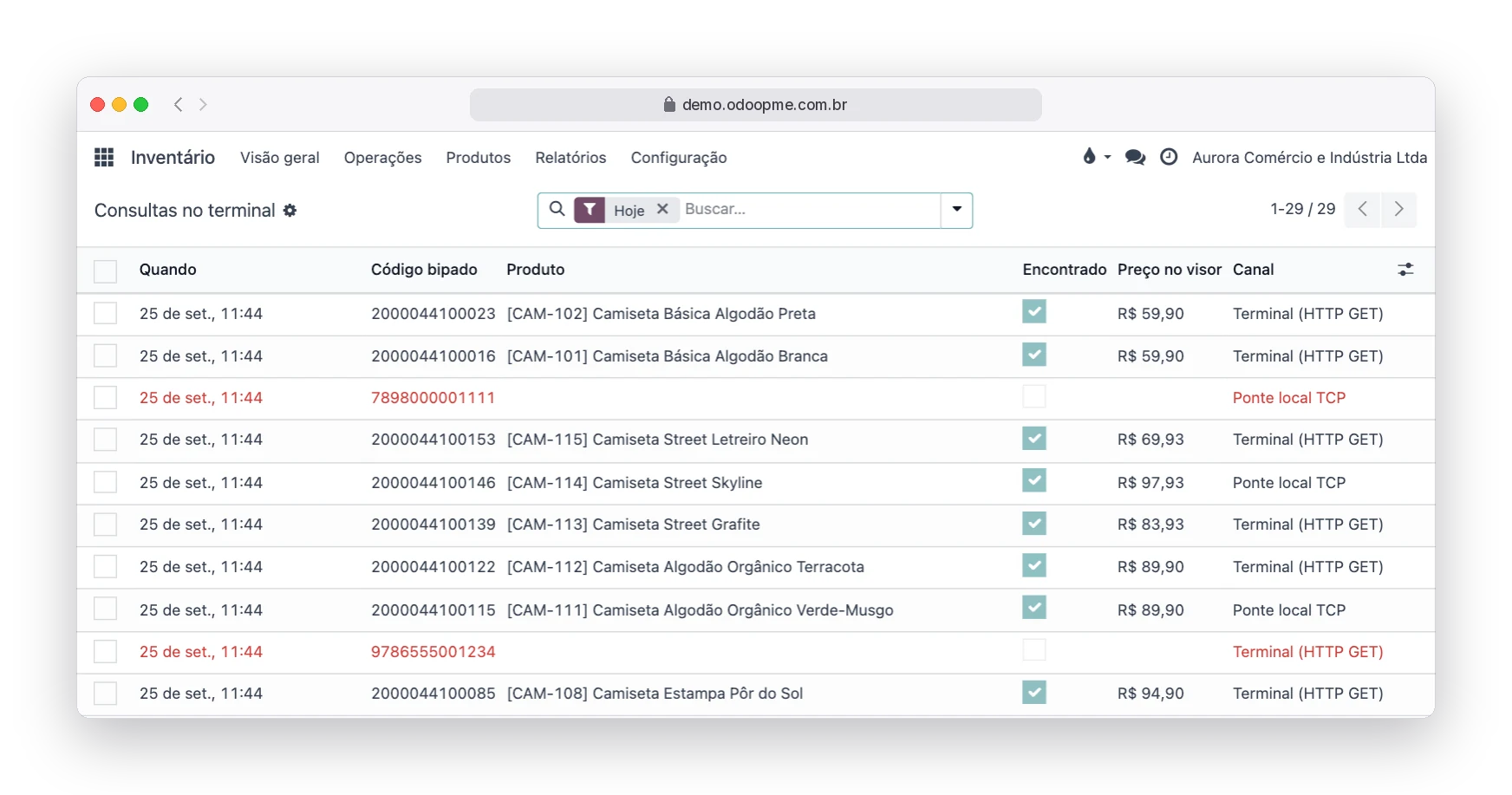
See what customers looked for and did not find
Every scan is logged under Inventory › Reporting › Terminal queries: code, product, displayed price and channel. The Not found filter reveals the codes customers tried that do not exist in the catalog, which becomes a sales and stock-correction opportunity.
- Queries by day, product or code
- Not-found codes highlighted in red
- Can be turned off if the store does not want a history
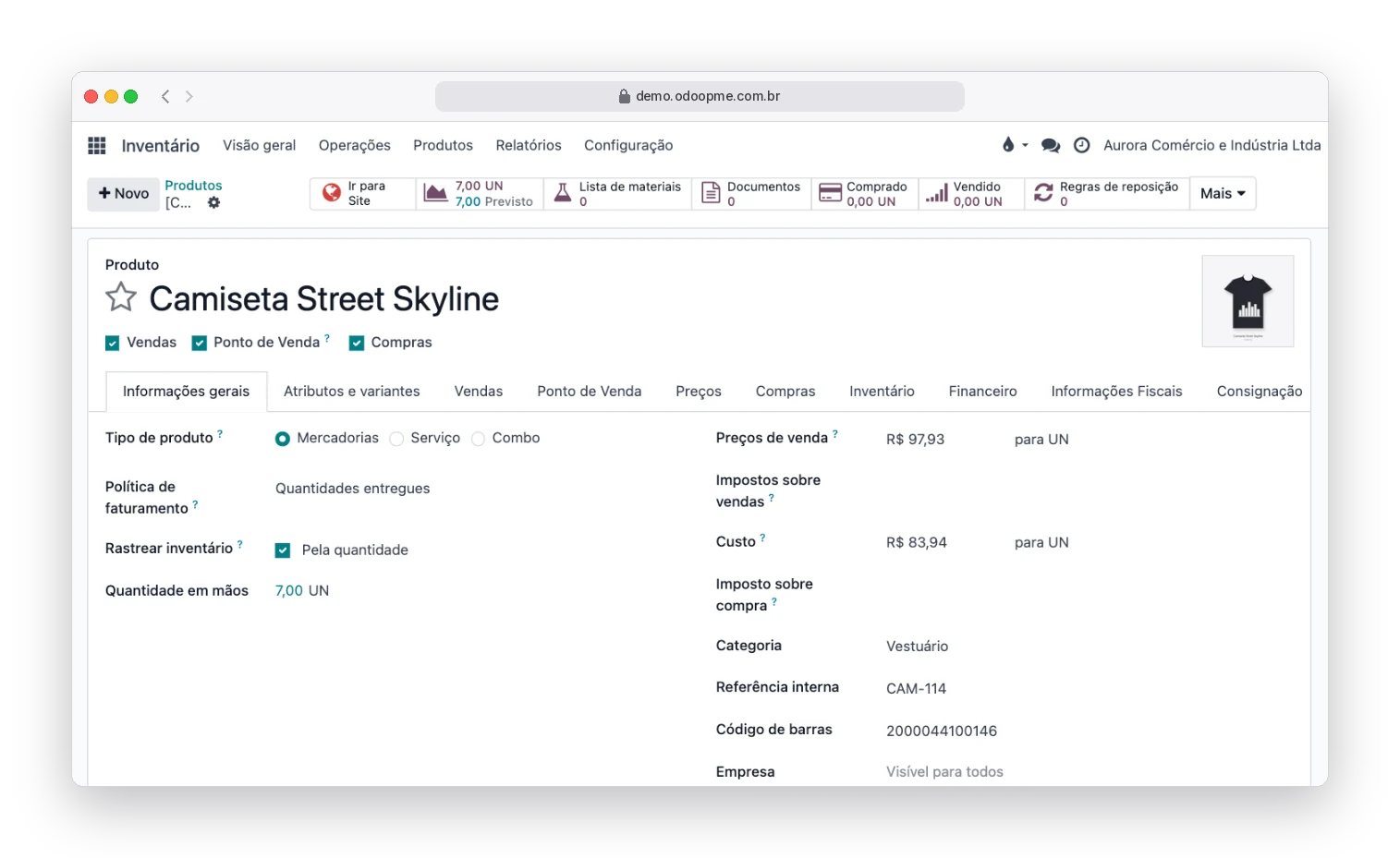
The catalog you already have is what the terminal uses
There is no second price database. The terminal reads the barcode from the product record and shows the sale price or the one from the chosen list. Change the price in RobSolution and the display changes at the same moment. For bookstores, the code is the ISBN and the price is the cover price.
- Barcode, ISBN or internal reference
- Price per list, including time-limited promotions
- Store stock shown to the customer, if you want
See the step-by-step setup guide in the documentation (in Portuguese) →
We are ready. Here is what your store needs to have
The integration is already in RobSolution. What changes from store to store is the equipment and the network, and that stays with you or whoever looks after your infrastructure.
Equipment and network
- A Gertec Busca Preço terminal (G2 line or compatible with the Gertec protocol), bought from Gertec or a reseller. The equipment is not included in the plan.
- Wi-Fi or wired network in the store with internet access and a power outlet near where the terminal will be.
- Direct mode: the terminal talks to RobSolution over the internet. Bridge mode: a store computer or mini PC runs a lightweight program we provide and talks to the terminal on the local network.
- Terminal setup (server IP or URL) done from the Gertec manual or by the reseller's technician, with the data RobSolution shows on screen.
System and integration
- Query endpoint in Gertec's native format and the local bridge for any model, already included in RobSolution.
- Security key per company, price list, display text and query report.
- During implementation we enable the feature, validate the query against your catalog and hand over the URLs for the terminal.
- Support through the help desk for everything on the system side. Terminal hardware faults or physical setup are handled by Gertec or the reseller.
Before buying the terminal, talk to us: we confirm the model and whether your store is better off in direct or bridge mode.
For every store where the customer chooses on their own
Wherever products are on display and prices change, the terminal takes the queue off the counter and the question off the salesperson.
Bookstores and stationery
Books do not take price tags. The ISBN on the back cover becomes the query and the cover price comes from the system.
Grocery and convenience
The supermarket classic, now tied to the same catalog that issues the NFC-e at checkout.
Building supplies and hardware
Thousands of small items with list prices. The customer checks on their own before heading to checkout.
Clothing, footwear and gifts
Price-list promotions show on the display immediately, without re-tagging the whole rack.
Pharmacies and cosmetics
Reliable prices for the customer and fewer people asking at the service counter.
Pet shops and farm supplies
Feed, accessories and supplies with frequent price changes and stock visible on the display.
What stores ask before installing
Which terminals work?
Gertec Busca Preço terminals, the standard in Brazilian retail. The G2 line (S and E) queries RobSolution directly over the internet; any model using the Gertec protocol on port 6500 works through bridge mode. If you already own a terminal, tell us the model before installing.
Do I need a computer in the store?
In direct mode, no: the terminal talks to RobSolution through the store's internet. In bridge mode, yes: an ordinary computer or a mini PC (such as a Raspberry Pi) runs the bridge program, which we provide ready to use with no dependencies to install.
Is the price shown the same as at checkout?
Yes, if you point the terminal to the same price list as the point of sale. It is a company setting, and you can pick another list if the store's policy differs between lookup and sale.
What if the product has no barcode?
The terminal also finds products by internal reference, so a label with the store's own code does the job. RobSolution prints barcode labels straight from the product record.
Several stores or several companies?
Each RobSolution company has its own key and settings. A single company can have as many terminals as it wants, all pointing to the same address.
Does this expose my system?
No. The query endpoint only returns name, price and stock, requires the company key and can be turned off at any time in Settings. No login, session or other data goes through it.
Is it included in my plan?
The price checker is part of the RobSolution apps. Talk to sales to confirm your environment version and schedule activation together with implementation.
Your store with a price checker on the wall, tied to the same system that issues the invoice
Tell us the size of the store and the terminal you have or plan to buy. Implementation gets everything working.