Consignment control: from the supplier's XML to the monthly settlement
Receive consigned goods straight from the supplier's NF-e, sell at the counter or on an invoice, and close the settlement with the right symbolic return and purchase. Your store pays only for what it sold, and the system knows who owns every item.
- Reads the 5917/6917 shipment from the XML
- Third-party stock kept apart
- Payables only at settlement
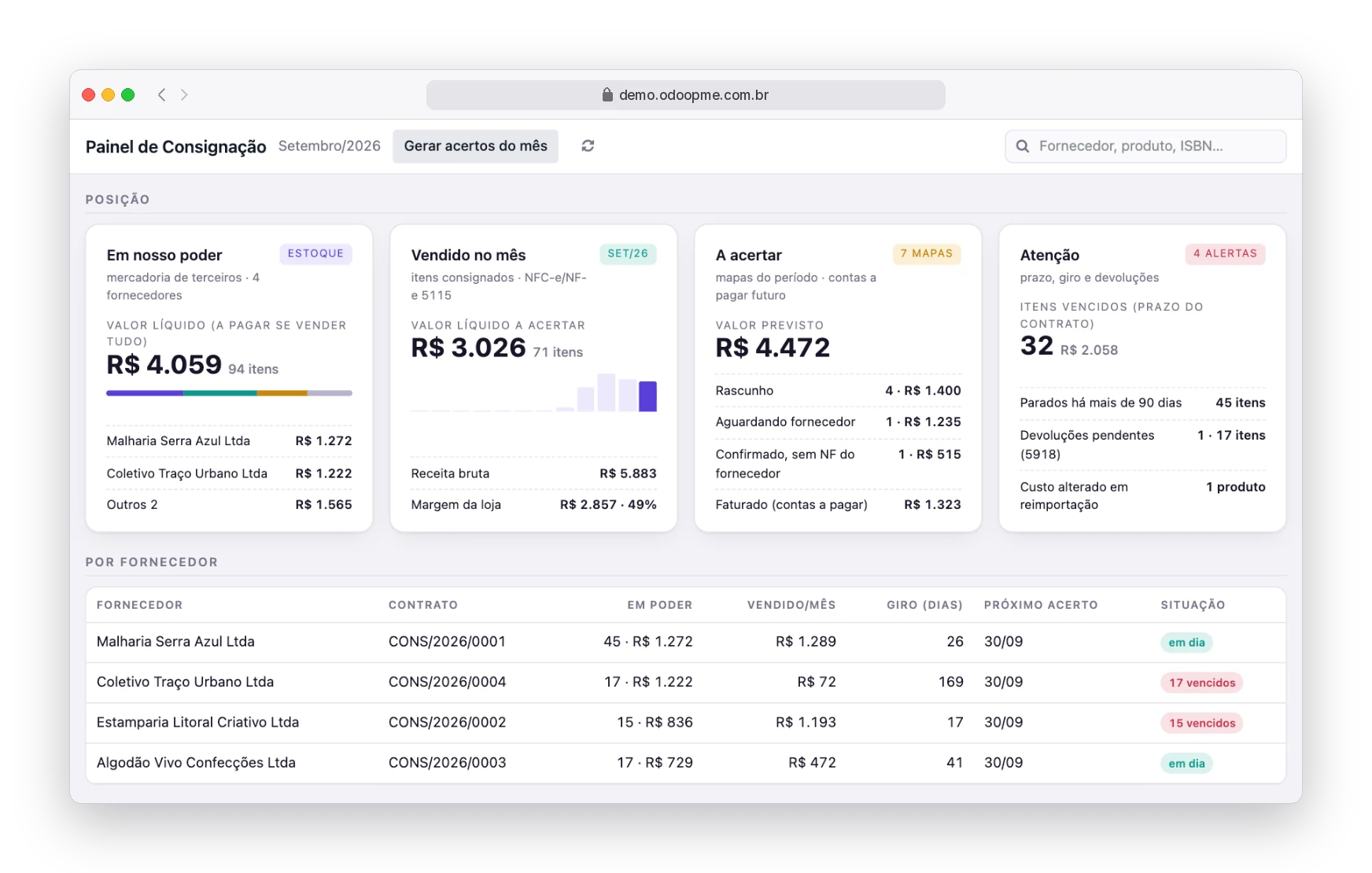
For any store that sells third-party goods
The app is generic: it fits any business where the supplier leaves goods at the store and is paid only for what sells.
Bookstores
Publishers and distributors leave titles on consignment and the settlement comes from sales recorded at the counter.
Clothing stores
Independent labels and apparel makers with per-item payout, revenue split or volume tiers.
Jewelry stores
High-value pieces with balance per supplier, barcode counts and return deadlines.
Footwear and accessories
Size and color grids per supplier, with alerts for items idle for over 90 days.
Optical stores
Frames and sunglasses on consignment, returning what did not sell within the term.
Convenience stores and delis
Regional and small-producer products at the point of sale, with payout per item sold.
Gifts and home decor
Pieces from artisans and small brands with contract, term and statement for each supplier.
Any other business
If the supplier leaves the goods and you only pay for what sells, this app was made for you.
Received consignment is not sent consignment
They are two sides of the same deal. This app was built for the receiving side, exactly the one most management systems leave out.
Received consignment
You are the consignee: the store that receives the goods and resells them.
- The goods remain the supplier's property until sold
- Entry from the supplier's shipment NF-e: 5917/6917 becomes 1917/2917
- Sale to the consumer with CFOP 5115/6115
- At settlement: symbolic return 5919/6919 and purchase 1113/2113
- Unsold items go back with a physical return 5918/6918
Sent consignment
You are the consignor: the manufacturer, publisher or distributor that places goods in stores.
- Issues the consignment shipment NF-e 5917/6917
- The goods stay in its inventory, held by third parties
- Invoices the sale with 5113/5114 once the store reports what sold
- Gets back what was left: 1918/2918 and 1919/2919
Are you a supplier sending goods on consignment? RobSolution issues the shipment and sales invoices as usual, with the consignment CFOP set in the fiscal position.
From XML to settlement in five steps
Every screen below is the live system, with a fictitious T-shirt store and five demo suppliers.
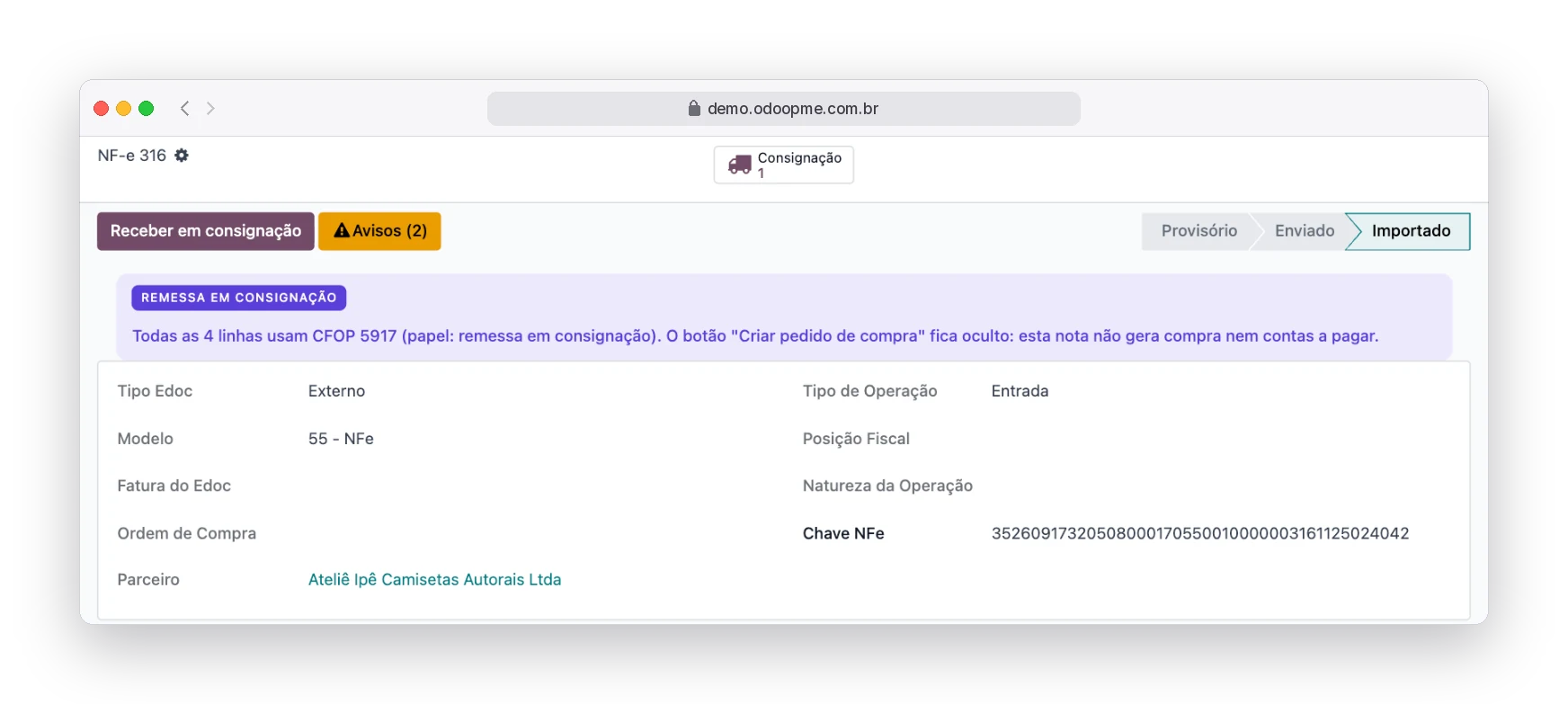
The XML arrives and the system recognizes the shipment
Through the recipient's manifest (MD-e) or by importing a standalone XML, an NF-e with CFOP 5917/6917 is flagged as a consignment shipment. The purchase order button disappears and a notice makes it clear that this document creates no payables.
- CFOP flagged as consignment right in the CFOP record
- Ready-made fiscal positions for each stage
- Shipment access key stored for the returns
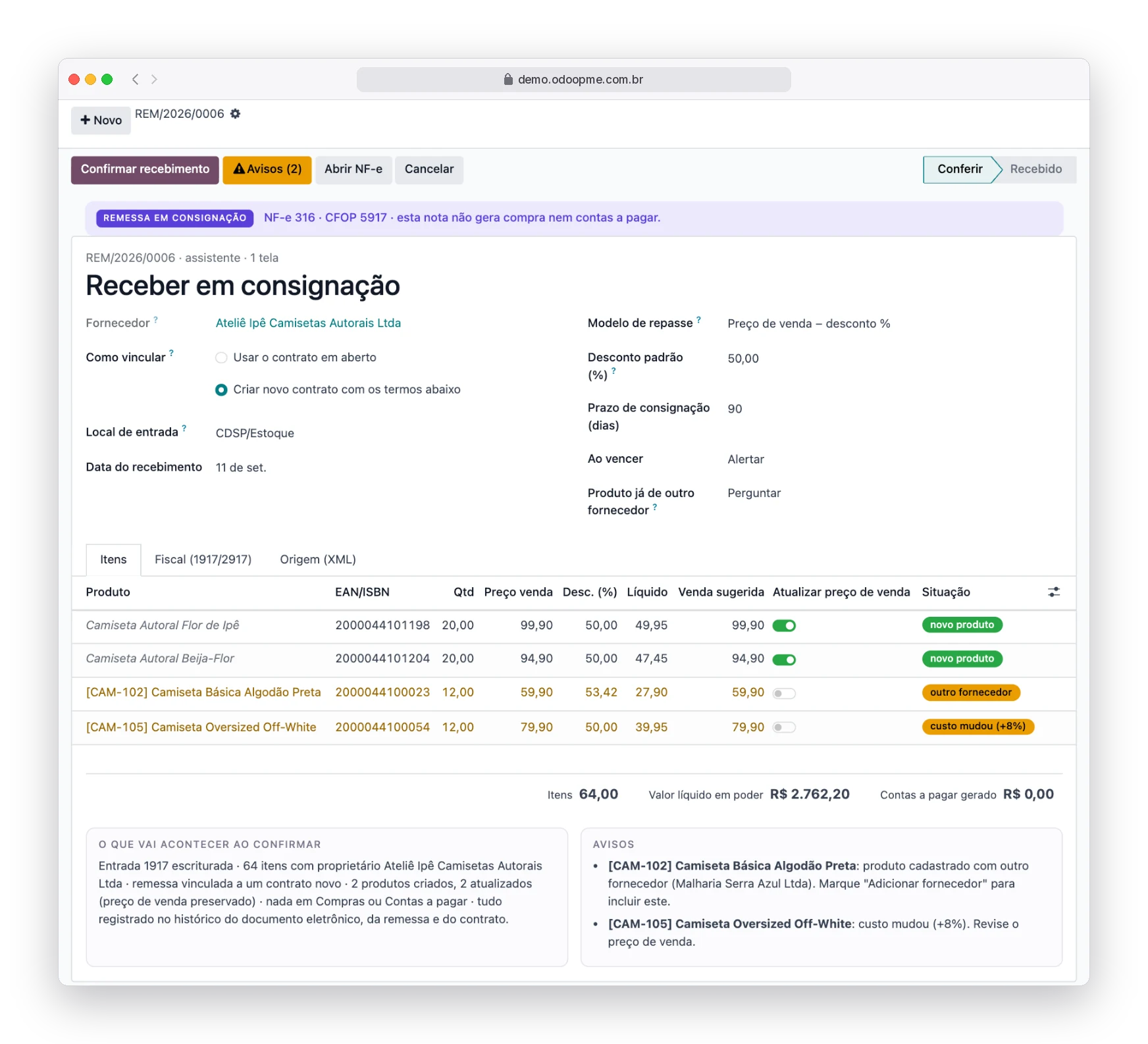
Check-in and entry on a single screen
The wizard lists every XML item, creates new products, warns when a product already belongs to another supplier or when the cost changed, and records the 1917/2917 entry.
- Stock owned by the supplier, not valued as yours
- Sale price suggested by the contract rules
- Summary of what will happen before you confirm
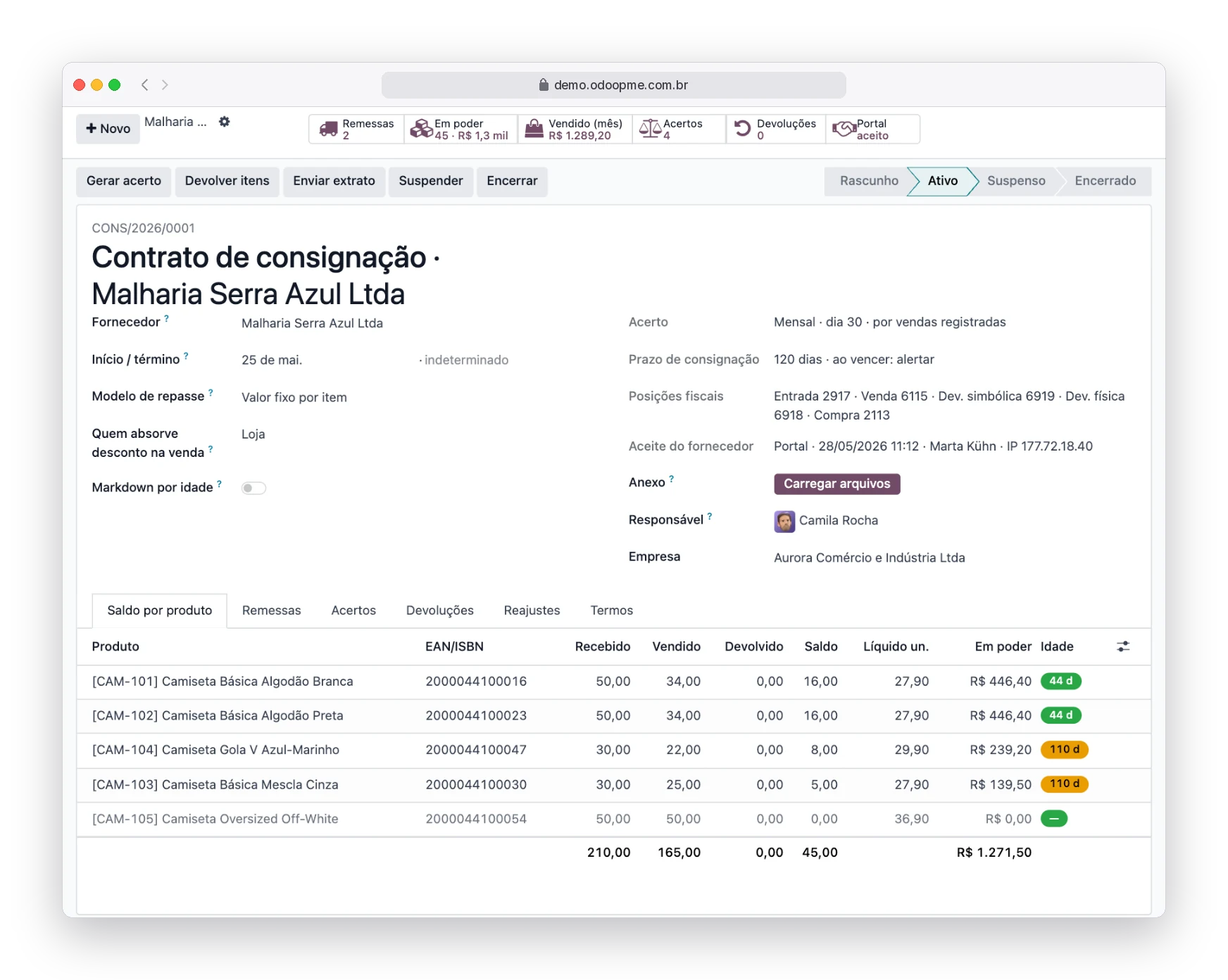
One contract per supplier, with clear rules
Payout model (fixed amount per item, discount off the sale price, revenue split or tiers), consignment term, who absorbs discounts and age-based markdowns. The supplier accepts through the portal, with date, name and IP recorded.
- Balance per product: received, sold, returned and on hand
- Age of every batch with expiry alerts
- One-click statement for the supplier
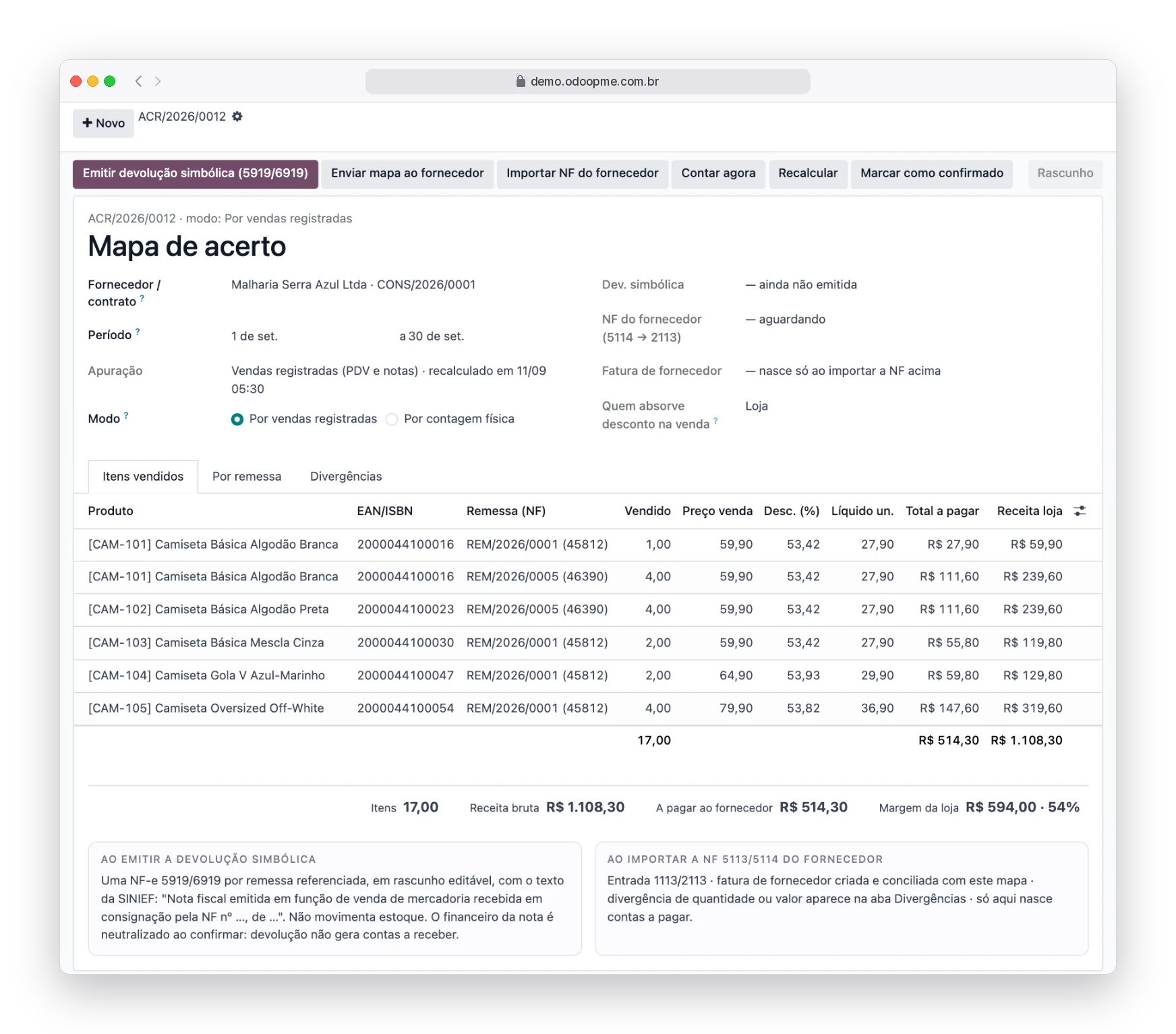
Monthly settlement without spreadsheets
The settlement map calculates what each supplier sold in the period, shipment by shipment. With one click you issue the 5919/6919 symbolic return with the Ajuste SINIEF 02/93 wording and send the map to the supplier. Payables are only created when the supplier's 5113/5114 invoice comes in as a 1113/2113 purchase.
- Gross revenue, amount payable and store margin side by side
- Quantity and value mismatches flagged instantly
- Returns create no receivables: the financial side is neutralized
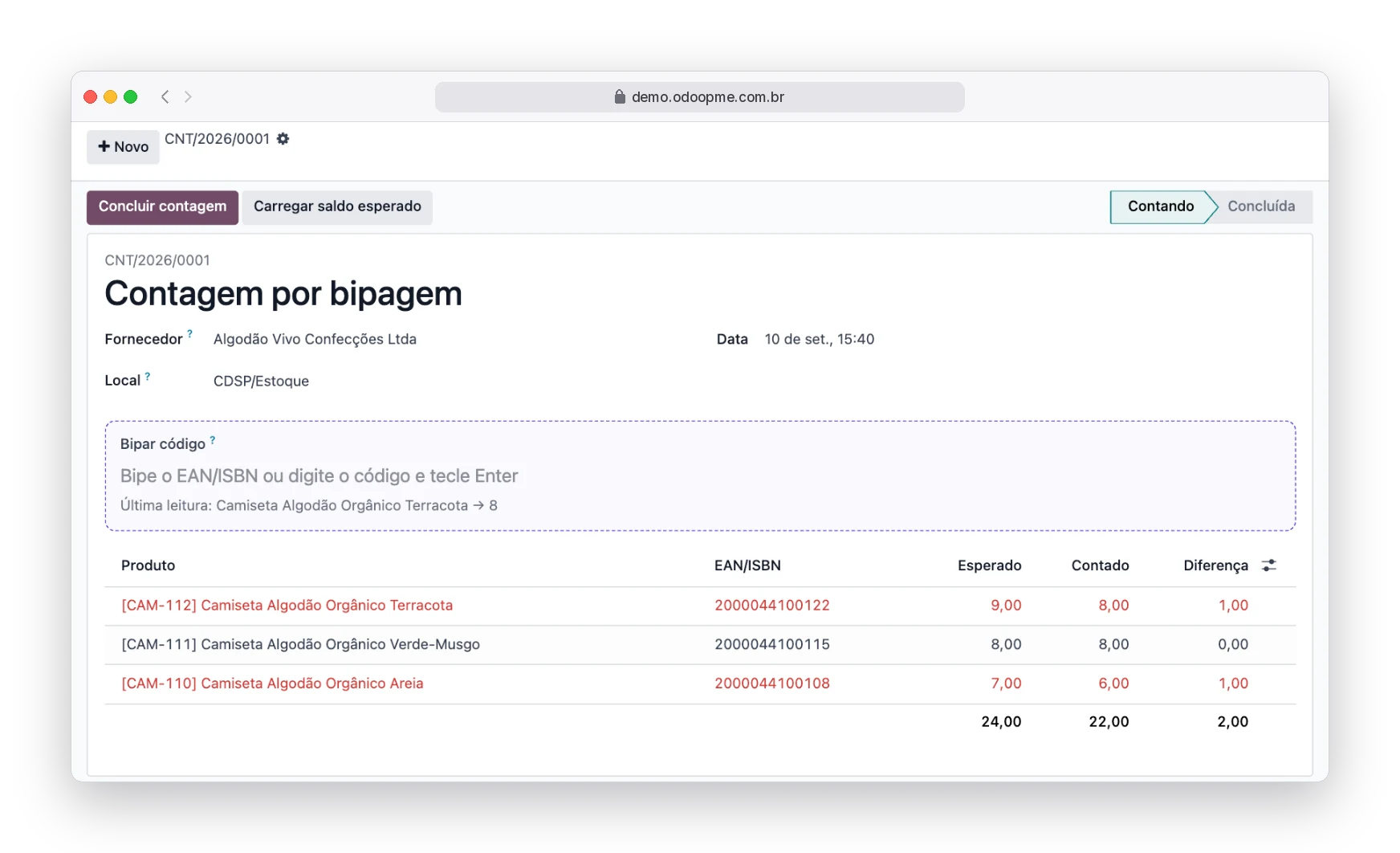
Barcode counts and returns of unsold items
Count a supplier's goods with a barcode scanner and see right away what is missing or extra. Expired or idle items become a 5918/6918 physical return referencing the shipment NF-e.
- Reads EAN or internal codes
- Differences highlighted before closing
- Return ready to issue
The full tax chain, already configured
Each stage uses the right CFOP and fiscal position, within and across states. You flag which CFOPs are consignment in the CFOP record, and the system does the rest.
- 5917 · 6917Supplier shipsConsignment shipment NF-e
- 1917 · 2917You record the entryThird-party stock, no payables
- 5115 · 6115You sellNFC-e or NF-e to the customer
- 5919 · 6919Symbolic returnOf what sold in the period
- 5113 · 5114 → 1113 · 2113Purchase at settlementPayables are created here
- 5918 · 6918Physical returnOf what did not sell
Legal basis: Ajuste SINIEF 02/93. Check your state's ICMS rules with your accountant.
Built for the daily routine of consignment retail
Real third-party stock
Goods come in owned by the supplier: they show in inventory, but not on your balance sheet.
No fake purchase orders
The shipment never becomes a purchase or a bill. No entries to reverse later.
Payables at the right time
Created only at settlement, when the supplier's sales invoice is imported.
Returns with no financial impact
5919 and 5918 documents are issued without creating receivables.
Supplier portal
Contract acceptance, statement and settlement map, with no spreadsheets going back and forth by email.
Term and turnover alerts
Expired items, items idle for over 90 days and cost changes on re-import.
Payouts your way
Fixed amount, discount off the sale price, revenue split or volume tiers.
Full traceability
Every step logged in the history of the e-document, the shipment and the contract.
Questions about consignment
What is received consignment?
It is when your store receives goods from a supplier without buying them. They remain the supplier's until sold: you pay only for what sold and return the rest.
How is it different from sent consignment?
In sent consignment you are the supplier who places goods in stores and issues the shipment. In received consignment you are the store. The Consignment app handles the receiving side.
Do I need to issue an invoice when the goods arrive?
No. The shipment NF-e is issued by the supplier. You record the 1917/2917 entry from the supplier's XML, via the recipient's manifest or a standalone import.
Does consigned stock show in my inventory?
Yes, kept apart as third-party stock, owned by the supplier. You sell it normally, but it is not valued as yours and creates no payables.
How does the sale work at the counter?
The NFC-e or NF-e automatically uses CFOP 5115/6115 for consigned items, and the system tracks which shipment each item came from.
Does my supplier need to use RobSolution?
No. They only need to issue the shipment NF-e. The supplier portal is optional, for contract acceptance and checking statements and settlement maps.
Does it fit my business?
It fits bookstores, clothing stores, jewelry stores, footwear, optical stores, convenience stores, gift shops and any business that sells third-party goods.
How do I get it?
The Consignment app is an exclusive RobSolution Tecnologia solution for RobSolution. Talk to a specialist to add it to your plan and plan the rollout with your suppliers.
Your store only pays for what it sells. Your system should know that.
We will show you the app running with your kind of goods and your suppliers.